









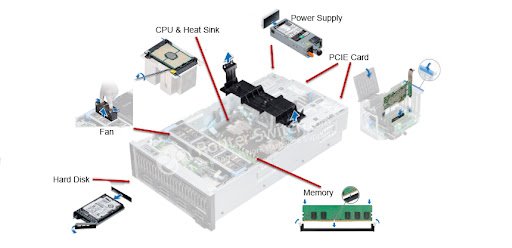
Servers are the heart of modern IT infrastructure. Whether in data centers, corporate environments, or cloud platforms, servers provide the processing power, storage, and connectivity needed to run applications and manage vast amounts of data. At the foundation of every server lies its core components, the critical hardware parts that determine performance, reliability, and scalability.
In this article, we’ll break down the essential server core components and why they matter.
The Central Processing Unit (CPU) is the brain of the server. It handles computations, task scheduling, and workload management. Enterprise servers often use high-performance, multi-core processors from Intel Xeon or AMD EPYC families.
Key Features to Look For:
Random Access Memory (RAM) determines how much data a server can handle at once. For enterprise workloads such as virtualization, cloud computing, and databases, high-capacity and high-speed RAM is essential.
Types of Server RAM:
The server motherboard acts as the backbone that connects all components. It includes sockets for CPUs, slots for RAM, and interfaces for storage, power, and networking.
Why It Matters:
Servers need reliable storage access. RAID (Redundant Array of Independent Disks) controllers and SAS (Serial Attached SCSI) cards manage how hard drives or SSDs interact with the system.
Benefits of RAID Controllers:
Network connectivity is vital for servers. NICs provide wired connections to local networks and the internet. Enterprise servers often use multiple NICs for redundancy and faster throughput.
Modern Features:
Servers require stable and redundant power. High-efficiency power supply units (80 PLUS certified) reduce electricity costs and heat generation.
Enterprise Features:
Heat management is critical. Servers use advanced cooling systems with multiple fans, heatsinks, or liquid cooling solutions to ensure optimal performance and prevent thermal shutdowns.
The chassis houses and protects all server components. Depending on deployment, servers may come in: